
Maintaining Go Forks
This is a tutorial on maintaining a fork of a go dependency with the replace directive in go.mod.
When using any language, it is common to run into an error with a dependency, and you ne4ed to fix it yourself. Alternatively, your use of the library may be slightly different that what the maintaner wants to support, and so you need to maintain your own fork of the library.
Fortunately, go modules are pretty good at supporting this need with the replace directive. We’ll go through the process of creating a fork of a git repository, making changes, and updating your project dependency.
Setting Up
If you want to follow along with the process detailed here, the two repositories for this example are:
- The library to fork: https://github.com/naterarmstrong/forkable-library
- Your go project depending on the fork: https://github.com/naterarmstrong/go-fork-practice
Your Go Project
Your go project is a very simple one, and it only has two short files. You can practice modifying this by cloning the practice library with
git clone git@github.com:naterarmstrong/go-fork-practice.git
First, we have our go.mod, which specifies the name of our module, the go version, and that we depend on the forkable library.
module github.com/naterarmstrong/go-fork-practice

go 1.22

require github.com/naterarmstrong/forkable-library v1.1.0
Second, we have our main function, which is a very simple CLI tool that uses the library to apply an echo effect to the argument passed in.
package main

import (
	"fmt"
	"os"

	"github.com/naterarmstrong/forkable-library/echo"
)

func main() {
	if err := run(os.Args); err != nil {
		fmt.Fprintln(os.Stderr, "error:", err)
		os.Exit(1)
	}
}

func run(args []string) error {
	if len(args) < 2 {
		return fmt.Errorf("usage: %s <message>", args[0])
	}
	echo.Echo(args[1])
	return nil
}
Exposing the problem
When we first test this, we get a good output:
$ go-fork-practice Hello!
Hello!
hello...
hello...
However, when we try to check with a different input, the story is not so nice:
$ go-fork-practice Hello World!
panic: Only one word is supported!

goroutine 1 [running]:
github.com/naterarmstrong/forkable-library/echo.Echo({0x16bd3af59?, 0x0?})
	/src/go/pkg/mod/github.com/naterarmstrong/forkable-library@v1.1.0/echo/echo.go:13 +0x138
main.run({0x14000010020?, 0x0?, 0x14000052738?})
	/src/go-fork-practice/main.go:21 +0x88
    main.main()
	/src/go-fork-practice/main.go:11 +0x34
The Library
We look at the definition of the Echo function, and see that there’s a clear problem: The library maintainer refuses to support our use case! We need to be able to input multiple words! There’s only one thing to do, reach for the fork button!
// Echo echoes a word so that it appears to echo in the terminal.
func Echo(s string) {
	// Maintainer's Note: Echoing multiple words is not in scope for this library and will not be supported.
	words := strings.Split(s, " ")
	if len(words) > 1 {
		panic("Only one word is supported!")
	}
	lowerCaseWord := strings.ToLower(words[0])
	noPunctuationWord := strings.TrimRightFunc(lowerCaseWord, func(r rune) bool {
		return r == '!' || r == '.'
	})
	fmt.Printf("%s\n%s...\n%s...\n", words[0], noPunctuationWord, noPunctuationWord)
}
Creating and Depending on a Fork
Creating a Fork
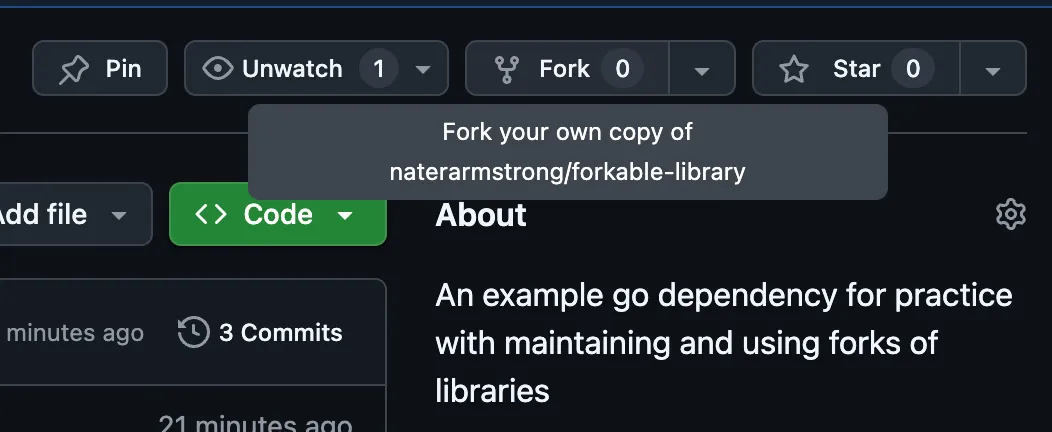
To create a fork of a git repository on github, just press the fork button to create your own version under my-user/forkable-library.
Now, we need to clone this repository:
git clone git@github.com:my-user/go-fork-practice.git
change the implementation of echo:
// Echo echoes a string so that it appears to echo in the terminal.
func Echo(s string) {
	words := strings.Split(s, " ")
	lowerCaseWord := strings.ToLower(words[len(words) - 1])
	noPunctuationWord := strings.TrimRightFunc(lowerCaseWord, func(r rune) bool {
		return r == '!' || r == '.'
	})
	fmt.Printf("%s\n%s...\n%s...\n", words, noPunctuationWord, noPunctuationWord)
}
Testing Changes to your Fork
Let’s depend on it for local testing. Adding this specific change to your project’s go.mod assumes that the forkable-library directory on your local system is at the same level as go-fork-practice:
replace github.com/naterarmstrong/forkable-library => ../forkable-library
This tells Go that it should look in your local filesystem to find the repository, instead of going to github to fetch it. If we tidy the mod (go mod tidy), install (go install ./...), and run our earlier example with this code instead, we get a better result:
$ go-fork-practice "Hello World\!"
Hello World!
world...
world...
Remote Build Systems
If you need to check if your build will work on a remote system, it won’t be feasible to depend on a local directory. In that case, you can update the replace directive to depend on a specific commit of the forked library.
Add and commit your changes to the fork (git add *, git commit -m "Support multiple words"), and then retrieve a unique descriptor of the current fork commit with
$ git rev-parse --short=12 HEAD
d298b0add2ca
Then, update your replace directive to be
replace github.com/naterarmstrong/forkable-library => github.com/my-user/forkable-library d298b0add2ca
and let go find the canonical reference to that commit with go mod tidy. After this, you should be able to build this on any build system.
Committing Changes
Now that we know that our changes work, let’s add and commit our changes to the forked library. After that, let’s create a tag so we can easily reference it in our replace directive.
A reasonable convention is to append -fork to the end of the versions. For example, the library is currently tagged as v1.1.0, and so you can tag your commit as v1.1.0-fork with:
git tag v1.1.0-fork && git push --tags
Then, depend on the git repository by updating the replace directive to
replace github.com/naterarmstrong/forkable-library => github.com/my-user/forkable-library v1.1.0-fork
Pitfalls
Here are some things that you should not do:
Try to modify the library without a fork
This simply will not work. You will not be able to push that library to the remote repository, and so you won’t be able to depend on the library.
Try to depend on your fork directly
If you try to depend on your fork directly with something like require github.com/my-user/forkable-library v1.1.0, you will run into build errors because the declared name of the module in go.mod does not match the location at which go found the package. Go finds the package at my-user, but the package declares it lives at naterarmstrong.
Try only updating the declared name in
go.mod
If you try changing the name listed in go.mod, the library will not build due to dependencies in the same repository also referencing the full name.
Update the package name in
go.modand all project files
Although this can seem like the correct approach, you are likely opening yourself up for a world of merge conflicts if you try to keep your fork up to date with the remote. In addition, you will not be able to easily contribute fixes back to the remote.
Try to synthesize your own description of a commit for
go.mod
If you try to synthesize your own description of a commit for replacement by following the pattern you see in other go.mod files, you may be surprised to see it fail (I was!). Most go.mod dependencies end up being specified either by:
- The version itself, in the case that there is a tag for the commit in question.
- A commit identifier that looks like
v0.1.0-20230228162925-9b5d176a7c52. This identifier is made up of three parts:- The most recent tag in the history of the commit
- The UTC timestamp of the commit, formatted like
%Y%m%d%H%M%S. - The first 12 characters of the commit hash.
Although the plain commit hash is not a valid full identifier, go mod tidy will fix it for you.
Summary
Now you’ve successfully been able to fork a repository with difficult or absent maintainers. This can even be useful in actively maintained libraries in order to depend on your fixes before they go through the full process to become part of the mainline for the library.